This article presents the architecture and implementation of an AI home server assistant that enables natural language interaction with your Raspberry Pi infrastructure. The solution leverages n8n as the orchestration layer, OpenRouter (DeepSeek model) for LLM capabilities, and Telegram as the user interface, with a security-first design approach.
Problem Statement
Managing a home server infrastructure with multiple Docker projects requires frequent SSH access for monitoring, log analysis, and troubleshooting. Traditional approaches involve opening terminal sessions, remembering command syntax, and navigating directory structures. This creates friction, especially when quick checks are needed from mobile devices.
The AI home server assistant needed to address several requirements:
- Natural language interface accessible from any device
- Secure command execution with multiple validation layers
- Integration with Claude CLI for intelligent code analysis
- Conversation memory for contextual interactions
- Protection against dangerous operations
AI Home Server Assistant Architecture
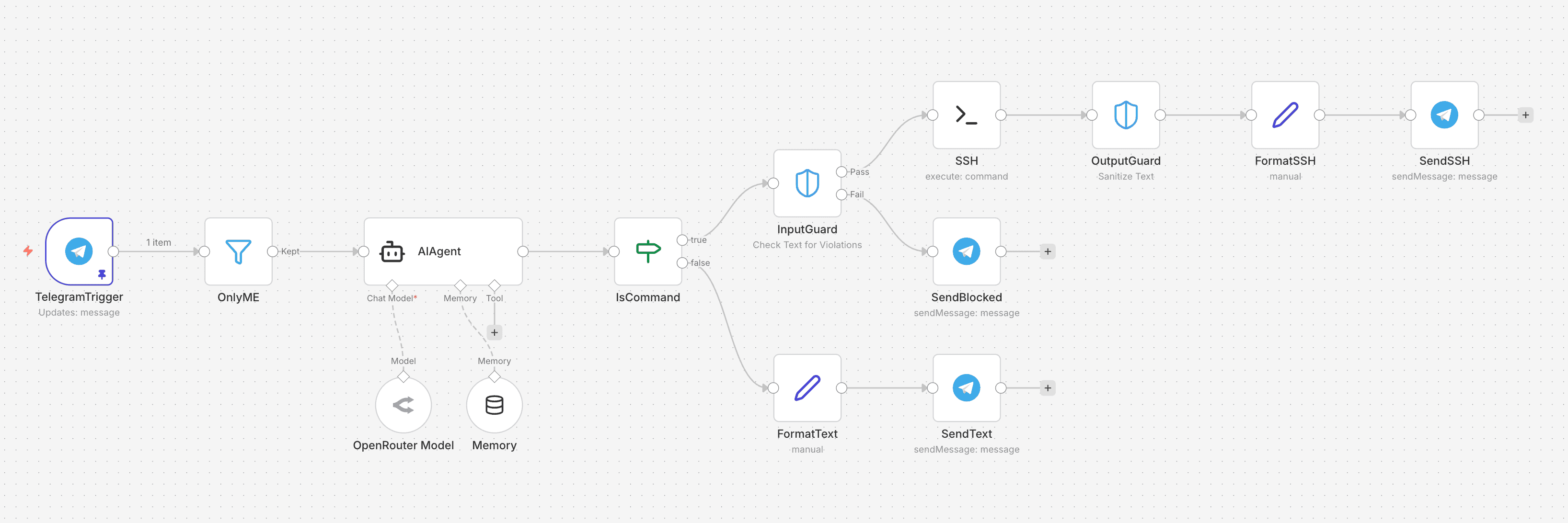
The AI home server assistant implements a defense-in-depth security model with six distinct processing stages:
┌─────────────────┐     ┌──────────────┐     ┌─────────────┐
│ Telegram Trigger│────▶│ User Filter  │────▶│  AI Agent   │
│   (Webhook)     │     │ (Auth Gate)  │     │ (DeepSeek)  │
└─────────────────┘     └──────────────┘     └──────┬──────┘
                                                    │
                        ┌───────────────────────────┘
                        ▼
              ┌─────────────────┐
              │ Command Router  │
              │ (Regex Match)   │
              └────────┬────────┘
                       │
         ┌─────────────┴─────────────┐
         ▼                           ▼
┌─────────────────┐         ┌─────────────────┐
│  Input Guard    │         │  Text Response  │
│  (Blocklist)    │         │  (Direct Send)  │
└────────┬────────┘         └─────────────────┘
         │
         ▼
┌─────────────────┐     ┌─────────────────┐     ┌─────────────┐
│  SSH Execute    │────▶│  Output Guard   │────▶│   Telegram  │
│  (Raspberry Pi) │     │ (PII Sanitize)  │     │    Send     │
└─────────────────┘     └─────────────────┘     └─────────────┘
Component Breakdown
| Stage | Component | Purpose |
|---|---|---|
| 1. Entry | Telegram Trigger | Webhook receiver for incoming messages |
| 2. Auth | OnlyME Filter | User ID validation (single authorized user) |
| 3. NLU | AI Agent + DeepSeek | Natural language understanding and command generation |
| 4. Routing | IsCommand | Regex classification: command vs conversation |
| 5. Security | InputGuard | Dangerous command blocklist |
| 6. Execution | SSH Node | Secure command execution on target host |
| 7. Sanitization | OutputGuard | PII removal from command output |
| 8. Response | Telegram Send | Formatted response delivery |
Technology Stack
LLM Configuration
The AI Agent uses OpenRouter as the LLM gateway, specifically configured with the deepseek/deepseek-chat model. This choice provides:
- Cost-effective inference for command interpretation
- Strong instruction-following capabilities
- Reliable tool-calling support
- Low latency responses suitable for interactive use
Memory Management
The workflow implements a Buffer Window Memory with a 10-message context window. Session isolation is achieved by keying memory to the Telegram chat ID, ensuring conversation context persists across interactions while remaining user-specific.
System Prompt Engineering
The AI Agent operates under a carefully crafted system prompt that defines its role as “RaffaelloBot” with explicit rules for command generation:
- Project-specific requests: Generates
cd+ Claude CLI commands for code analysis - System commands: Outputs direct bash commands (docker ps, df -h, etc.)
- Conversational queries: Responds in Italian for greetings and questions
Security Implementation
Layer 1: User Authentication
The first security layer validates the Telegram user ID against an authorized whitelist. Only messages from the configured user ID proceed to the AI agent. All other messages are silently dropped.
Layer 2: Command Classification
A regex-based router determines whether the AI output represents an executable command or a text response:
^(docker|cd |df |free |top |uptime|cat |ls |grep |tail |head |ps |/home/user|sudo )Commands matching this pattern proceed to security validation; non-matching outputs are sent directly as conversational responses.
Layer 3: Input Guardrails
The InputGuard node implements a comprehensive blocklist for dangerous operations:
| Category | Blocked Patterns |
|---|---|
| Destructive | rm -rf, rm -r /, shred |
| System Control | shutdown, reboot, poweroff, halt, init 0, init 6 |
| Disk Operations | mkfs, dd if=, >/dev/sd |
| Permission Escalation | passwd, chmod 777, chmod -R 777, chown -R root |
| Remote Code Execution | wget\|bash, curl\|sh, curl\|bash, base64 -d\|bash |
| Reverse Shells | nc -e, netcat -e |
| Fork Bombs | :(){ :\|:& }; |
| User Management | userdel, groupdel, visudo |
| History Tampering | history -c |
Commands matching any blocked pattern trigger a security response: “⛔ Comando bloccato per motivi di sicurezza.”
Layer 4: Output Sanitization
The OutputGuard node applies PII sanitization to all command outputs before transmission. This prevents accidental exposure of:
- API keys and tokens in environment variables
- Passwords in configuration files
- Private keys or certificates
- Personal identifiable information in logs
Claude CLI Integration
One of the most powerful features is the integration with Claude Code CLI. When users request code analysis or project explanations, the AI generates commands that invoke Claude CLI within the appropriate project directory:
cd /home/user/docker-compose-files/ai_trading && \
  /home/user/.local/bin/claude -p "check for errors in logs and code"
This enables sophisticated operations like:
- Error analysis across codebases
- Code explanation and documentation
- Log parsing and anomaly detection
- Dependency auditing
Managed Projects
The assistant is configured to manage the following Docker Compose projects:
- ai_trading – Automated trading strategies
- ai-stock-advisor – Stock analysis and recommendations
- autopublisher – Content automation
- freqtrade – Cryptocurrency trading bot
- kafka – Message streaming infrastructure
- market-monitor – Real-time market data collection
- n8n – Workflow automation (this project)
- ollama – Local LLM hosting
Deployment Considerations
Prerequisites
- n8n instance with Telegram and SSH credentials configured
- OpenRouter API key for LLM access
- SSH key-based authentication to target host
- Telegram bot token with webhook capability
Performance Tuning
The workflow is configured with a 600-second execution timeout to accommodate long-running Claude CLI operations. Memory buffer is limited to 10 messages to balance context quality with token costs.
Conclusion
This AI home server assistant demonstrates how modern AI orchestration tools can create powerful, secure interfaces for infrastructure management. The defense-in-depth approach ensures that even with natural language flexibility, security boundaries remain robust. The integration of Claude CLI transforms the AI home server assistant from a simple command proxy into an intelligent analysis tool capable of understanding and explaining complex codebases.
Related Reading
This article was written with Claude Code CLI by Anthropic.